A CLEARER WAY TO RUN YOUR PRACTICE
Your whole firm.
A clearer picture.
Clients, work, deadlines and reports.
Together in one straightforward workspace.
Just your email. No password or payment details.
One shared picture Clear responsibility Room to make it yours
CONNECTED BY DESIGN
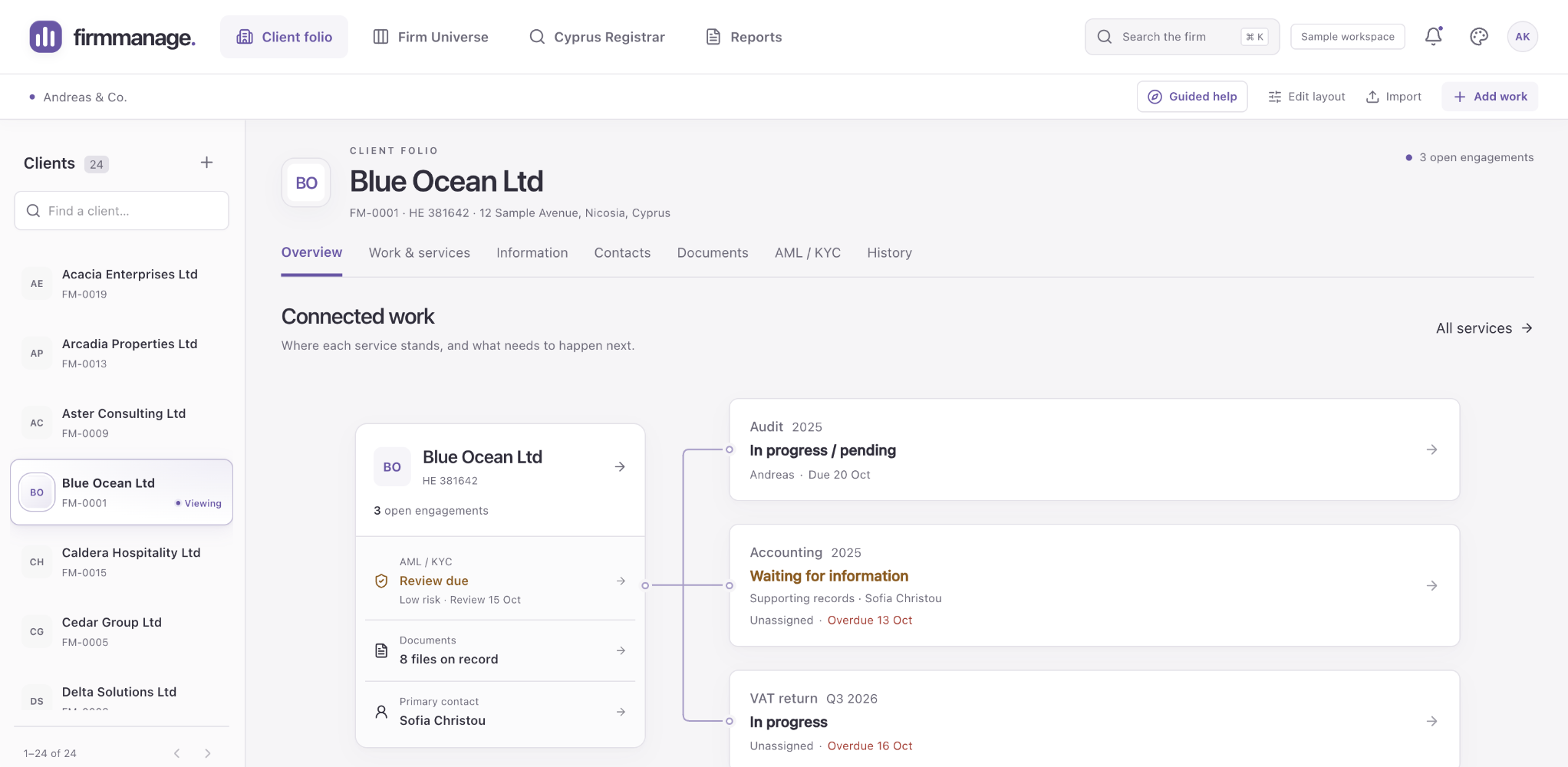
Everything has its place.
And everything connects.
Your team should spend its time doing the work.
Finding the information should be the easy part.
KNOW WHERE THINGS STAND
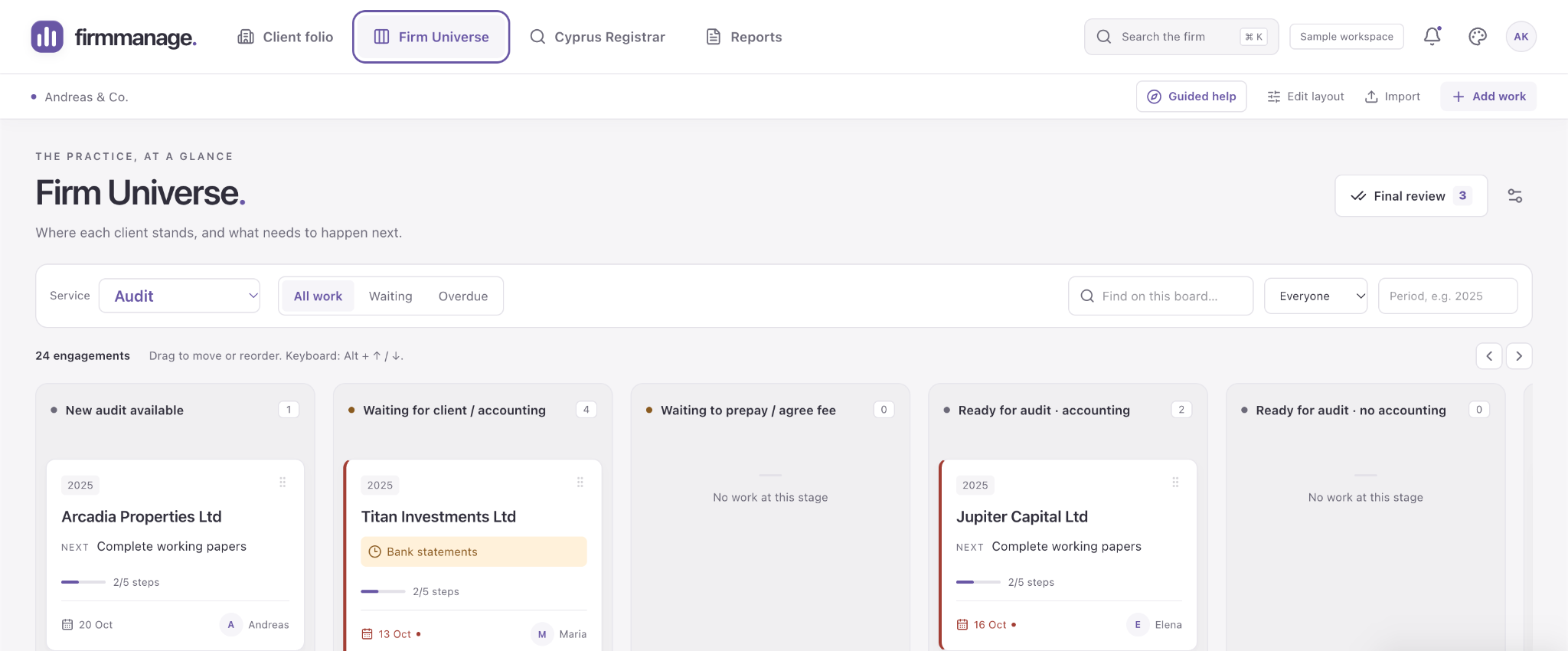
Less chasing. More clarity.
See the work, the person responsible and the next step together. Move from the firm-wide picture straight into the details that need you.
- Pipeline, yearly Overview and board Events
- Flexible stages that match your practice
- Owners, notes, deadlines and follow-on work
A DAY IN YOUR PRACTICE
From first import
to the final follow-through.
Choose a moment. See where it happens, what you do, and what comes next.
ONBOARDING
Keep the way you work. Lose the scattered pieces.
Bring your people and clients across, then import a Trello board or build a workflow around your own stages.
- 1Add your client types and any extra fields.
- 2Import people and clients from Excel or CSV, or fill in the templates.
- 3Bring a Trello JSON export, match people and clients, then review the import.
A connected starting point, with the matches checked before work is imported.
YOUR STARTING POINT
Bring the board you already know.
Paste or upload the board JSON. Review the columns, people and client matches before importing. Descriptions, exported comments, checklists and attachment links come across.
Try the prepared fictional boards in the demo. During a private trial, imports are limited to work for your existing clients.
Try it in the demoRename workflow stages. Add your own fields and choices. Choose, filter, sort and resize the columns relevant to each record; your table preferences stay saved in this browser.
HOW IT WORKS
Start with a look.
Make room
for your firm.
A public demo to explore, then a private trial for your team. Your first 3 months are free.
Explore the demo- 01
Explore the sample practice.
Enter your email to open the public demo. Try the clients, work and reports using fictional information and sample files.
- 02
A private instance for your firm.
Your trial runs in a separate firm workspace. Private instances are being prepared, with setup arranged directly. Public signups are not open.
- 03
Your first quarter, free.
The private trial is free of charge for 3 months, with 10 client records. Explore it with your team, then review the planned core pricing before deciding what comes next.
PLANNED CORE PRICING
One complete core.
A sensible price.
After the free three-month trial:
€100 per firm, per month.
Five users and 350 clients included.
The planned core includes all core features, with additional people at €10 per user per month. Paid service is not open yet.
- Client and work management
- Team workflows and deadlines
- Saved reports and exports
- Hosting and backups planned for launch
Planned service add-ons will have separate prices and clear allowances. They are not included in this calculator.
Your team. Your price.
CORE PLANExcludes applicable VAT. This illustrates the planned price after the free three-month private trial. Paid service and public registration are not open yet.
A FEW GOOD QUESTIONS
Before you
take a look.
Can I try it without an account?
Yes. Enter your email, with no password or account setup, and your browser gets its own sample practice. We store the address to identify demo interest; this does not subscribe you to marketing emails. Use fictional information and sample files only.
Can my firm register today?
Public registration is not open yet. This website is a place to explore FirmManage and try the demo. It does not create a live firm account or take payments.
What does the private trial include?
The planned private trial gives your firm a separate instance for 3 calendar months, with 10 client records and 3 individual entity screenings across the whole trial. Private hosting and screening integration are being prepared. No card or automatic charge; continuous AML monitoring is not included. Setup is arranged directly, and public registration is not open yet.
Can I bring my existing client list?
Yes. Guided onboarding accepts Excel and CSV lists, provides templates and lets you review the selected people and clients. You can also import a Trello board from its JSON export, or create your own client-linked workflow. Prepared fictional files are available in the demo.
Is the demo a shared office workspace?
The public demo is an individual sample workspace tied to your browser. It is separate from the private firm instances being prepared for teams, and is not a place for real client information.
Are AML screening and cloud document connections available?
These service integrations are still being prepared. The demo does not perform live AML screenings or connect to your firm’s cloud document accounts. Their final allowances will be stated before they are offered.
SEE HOW IT FEELS
A little less admin.
A lot more clarity.
Explore the demoOpen the sample practice. Make yourself at home.